IPTV free trial: test before you subscribe
Use your own screen, your own connection and a clear checklist. Find out whether the experience fits before choosing a subscription.
Current LibertyTV offer: 24 hours · $0 · no credit card required. Activation and eligibility are managed in your account.
Start Free Trial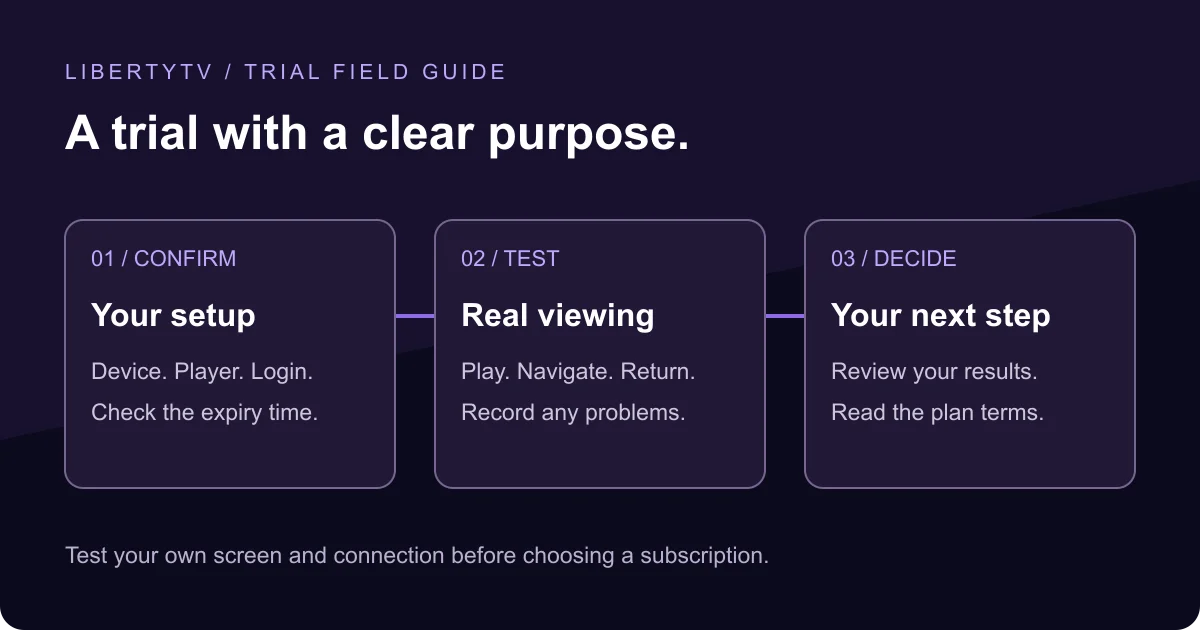
What the LibertyTV free trial is for
An IPTV free trial gives you a limited opportunity to evaluate an internet-delivered television service before committing to a paid subscription. LibertyTV currently advertises a 24-hour trial at no charge, with no credit card required. Start through the customer account system, where your activation instructions and account-specific details belong.
Treat those hours as a test window, not a race through the largest possible channel list. The useful question is whether the service works for your actual routine: the television you use most, your normal network, the player you can navigate and the viewing options important to you. A successful test on a phone does not automatically validate your living-room TV.
Check the exact activation and expiry information in your account before planning your test. This page does not promise that the clock begins at registration, that every package includes identical content, or that all devices work. Availability can depend on region, package and device configuration. A trial is also not evidence of content licensing or a guarantee of future performance.
Start with the account, then the right setup path
Use Start Free Trial to open LibertyTV’s existing registration page. It asks for your account details; this marketing page does not collect your password or payment information. If you already have an account, sign in and check the trial options available there rather than creating additional accounts to obtain more access.
Before activation, identify your device model, operating system and intended player. Keep the relevant setup guide open on another screen if possible. This avoids spending your test window searching through unrelated tutorials or trying a connection format your player does not accept.
Use only the credentials and connection instructions supplied for your account. Account activation and playable access are not necessarily the same step. If the next action, eligibility or delivery timing is unclear, ask through account support. Do not assume a competitor’s promise of instant credentials applies to LibertyTV.
- Identify your exact screen and operating system.
- Choose the matching guide below and confirm the player is available.
- Register or sign in, then follow the account’s activation instructions.
- Note the displayed expiry time and time zone before starting the checklist.
Choose a device you will actually use
The routes below summarize LibertyTV’s existing setup guides. They are starting points, not a promise that every model or app-store region is supported. Check availability on the exact device before paying for a separate player. Use the full guide for installation rather than mixing steps from different platforms.
| Device | What to confirm before testing | Setup path |
|---|---|---|
| Firestick / Fire TV | Exact model and OS. The custom-player APK route applies to compatible Fire OS devices, not Vega models. Test directional remote controls and Back. | Fire TV guide |
| Android TV / Google TV / Android Box | Player availability and manufacturer-specific installation menus. LibertyTV documents a Downloader route for compatible Android-based devices. | Android TV guide |
| Samsung / LG Smart TV | The appropriate Smarters player must be available for your TV model and region. Confirm the required account connection format before installation. | Smart TV guide |
| iPhone / iPad / Apple TV | LibertyTV’s guide uses Smarters Player Lite where available. Check the App Store listing on your device and use the complete connection details supplied to you. | Apple guide |
| Windows PC / laptop | Use a compatible desktop player from its official developer source. Check the supported Windows version and required login format. | Windows guide |
What to test during your IPTV trial
Use a small, repeatable test sheet: device and player version, connection type, time, task, result and any error message. Mark each task Pass, Needs help or Not available. This is your personal evaluation record—not a LibertyTV performance score or a claim that we tested your equipment.
Keep the starting conditions consistent. Changing the player, Wi-Fi connection and settings at once makes it difficult to identify what helped. Try the same task again after one change and keep the original result. A short successful session is useful evidence, but it cannot establish reliability for every future evening.
1. Setup and sign-in
Confirm you can install the supported player, enter your own account details and load the initial guide or library. Close and reopen the app once. Note whether the saved profile returns correctly and whether any error clearly identifies the missing information.
- Record how long the setup actually took you.
- Separate an installation problem from a rejected login or playback problem.
- Never include a password or full playlist URL in a public screenshot.
2. Playback under normal conditions
Choose a small sample of available content that matters to you, rather than treating a large list as proof of quality. Watch long enough to notice interruptions, audio problems or an unexpected stop. Return at your normal viewing time if the trial window allows, using the network and screen you expect to keep.
- Record the item, time and exact symptom when playback fails.
- Distinguish content marked unavailable from content that starts and then interrupts.
- If testing another connection, change one variable and repeat the same task. Do not bypass restrictions or security warnings.
3. Navigation, guide and accessibility
Try the ordinary tasks you repeat: browse categories, open programme information, search, return to playback and find a favourite. Check text size, selection highlights, audio options and subtitles where available. For a television, judge this from your normal seat with its remote, not only from close range.
4. Help when something goes wrong
If a task fails, use the account help route with your device, player version, error and the steps already tried. Record whether the guidance solves your particular issue. Do not assume a response-time guarantee. A problem that remains unresolved before purchase is a reason to pause and ask, not to buy a longer plan hoping it will disappear.
A player trial is not a streaming subscription
An IPTV player is the software used to organize and play the sources supplied to it. Your service account provides the access and connection details. The player’s licence, its optional premium features and a LibertyTV subscription are separate things. An app called “free” does not establish that a content subscription is included.
This distinction matters with searches such as “IPTV Smarters Pro free trial.” A result may describe software, a service configured for that software or an unrelated seller using a similar name. Verify the developer and the provider separately. LibertyTV’s device guide identifies the intended setup route; it does not make every similarly named download trustworthy.
The custom LibertyTV app and third-party players may require different details. For example, the existing custom-app instructions use a username and password, while other routes can require a server URL as well. Never guess a server address or pay for a new subscription just because the wrong login method failed.
Free trial versus paid plan: compare the commitment
Use the trial to answer practical questions, then use the current plan and account terms to decide what to purchase. Do not assume that “trial” means every paid feature, connection allowance or content option is identical. Confirm the configuration you tested is the one you are considering buying.
| Decision | Free trial | Paid subscription |
|---|---|---|
| Purpose | Evaluate your own setup during a limited window. | Continue access under the selected plan’s terms. |
| Price and duration | Current advertised LibertyTV offer: $0 for 24 hours; no card required. | See current pricing, duration and applicable taxes before purchase. |
| Access and devices | Confirm your trial’s available content, player and connection limits in the account. | Confirm the purchased package and allowed connections; do not infer them from the trial. |
| Player costs | A third-party player may have separate commercial terms. | Paying for LibertyTV does not automatically purchase a separate player licence. |
| Next action | Review your results before the displayed expiry. | Review renewal, cancellation and refund conditions before confirming payment. |
Before your trial expires
Review the test sheet while there is still time to ask about unresolved issues. Three questions are enough to organize the decision: did the essential tasks work, were the important limits clear, and is the paid offer acceptable? Optional features should not distract from an unresolved sign-in or playback problem.
Check the expiry and next-step instructions displayed in your account. The public offer establishes 24 hours with no card required, but this guide does not confirm the account-specific clock start, automatic renewal or exact post-expiry behavior. Do not assume a trial extends itself, converts automatically, or requires a particular cancellation action. Resolve those details in the account before relying on them.
If you decide to continue, compare the current plans and confirm the terms at purchase. The published refund policy has eligibility conditions and exclusions, including ones related to free-trial offers. A successful trial is not a substitute for reading those terms, and this guide does not promise a refund.
- Save your device/player details and results, without exposing credentials.
- Confirm essential content and features for the package you intend to buy.
- Ask about any unresolved errors, connection limits and expiry instructions.
- Review current price and terms; subscribe only when the remaining questions are answered.
Common questions
Which IPTV has free trials?
LibertyTV currently advertises a 24-hour free trial with no credit card required. Use the official account registration route and confirm eligibility and activation details there. This page does not rank or endorse other providers.
Does LibertyTV offer a 30-day free trial?
The current public LibertyTV offer is 24 hours, not 30 days. Other durations appearing in search results are not evidence of a LibertyTV offer. Check your account for current terms.
Is an IPTV free trial a permanently free subscription?
No. A trial is a limited evaluation period, not an indefinite subscription. Check the displayed expiry and decide separately whether to purchase a paid plan.
Do I need a credit card for the LibertyTV trial?
The current public offer says no credit card is required. Registration and activation take place in the LibertyTV customer account system. Separate player purchases have their own terms.
Does a free IPTV player include a free service account?
Do not assume so. A player is software; a service account supplies the access and connection details. Check which product an offer covers before installing, registering or paying.
Sources & related guidance
Developer and LibertyTV guidance checked on September 13, 2026. App availability and commercial terms can change.